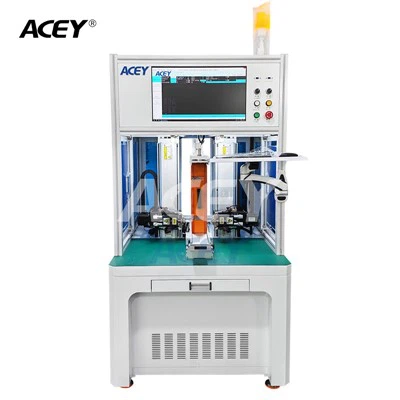
Transferring data from a Battery Cycler Tester to a computer is a crucial process for battery researchers, manufacturers, and quality control professionals. As a leading supplier of Battery Cycler Testers, we understand the importance of seamless data transfer and the challenges it may pose. In this article, we will explore the various methods and best practices for transferring data from our Battery Cycler Testers to a computer.
Understanding the Battery Cycler Tester
Before delving into the data transfer process, it's essential to understand the basic functions of a Battery Cycler Tester. A Battery Cycler Tester, such as our Battery Charge and Discharge Machine, is a device used to charge and discharge batteries under controlled conditions. It measures various parameters, including voltage, current, capacity, and temperature, during the charging and discharging cycles. This data is crucial for evaluating the performance, safety, and lifespan of batteries.
Our Battery Cycler Testers are equipped with advanced features and high - precision sensors to ensure accurate and reliable data collection. However, the real value of this data lies in its analysis, which can only be effectively done on a computer using specialized software.
Methods of Data Transfer
USB Connection
One of the most common and straightforward methods of transferring data from our Battery Cycler Tester to a computer is through a USB connection. Our testers, like the 5V 40A Polymer Battery Charge Discharge Capacity Tester, are equipped with a USB port that allows for easy connection to a computer.
To transfer data using a USB connection, follow these steps:
- Power off the Tester: Before connecting the USB cable, make sure the Battery Cycler Tester is powered off to avoid any electrical surges or damage.
- Connect the USB Cable: Connect one end of the USB cable to the USB port on the Battery Cycler Tester and the other end to an available USB port on the computer.
- Power on the Tester: Once the cable is connected, power on the Battery Cycler Tester. The computer should recognize the device automatically. If it doesn't, you may need to install the appropriate drivers, which can usually be found on our official website.
- Access the Data: After the device is recognized, you can access the data stored on the Battery Cycler Tester through the computer's file explorer. Copy or move the data files to the desired location on your computer.
Ethernet Connection
For more advanced applications and large - scale data transfer, an Ethernet connection may be preferable. Our Battery Charge and Discharge Tester supports Ethernet connectivity, allowing for fast and reliable data transfer over a local area network (LAN) or the internet.
Here's how to transfer data using an Ethernet connection:
- Network Configuration: First, ensure that the Battery Cycler Tester and the computer are connected to the same network. Configure the IP address, subnet mask, and gateway settings on both the tester and the computer to enable network communication.
- Software Installation: Install the dedicated software provided by us on the computer. This software is designed to communicate with the Battery Cycler Tester over the Ethernet network and retrieve the data.
- Connect to the Tester: Launch the software on the computer and use it to establish a connection with the Battery Cycler Tester. Enter the IP address of the tester when prompted.
- Data Transfer: Once the connection is established, you can use the software to initiate the data transfer process. The software will retrieve the data from the tester and save it on the computer in a format that can be easily analyzed.
Wireless Transfer
Wireless data transfer is becoming increasingly popular due to its convenience and flexibility. Our Battery Cycler Testers support Wi - Fi connectivity, allowing for wireless data transfer to a computer.
To transfer data wirelessly:
- Wi - Fi Setup: Configure the Wi - Fi settings on the Battery Cycler Tester to connect to your local Wi - Fi network. Enter the network name (SSID) and password when prompted.
- Software Compatibility: Ensure that the computer is also connected to the same Wi - Fi network. Install the compatible software on the computer, which enables wireless communication with the tester.
- Connection Establishment: Open the software on the computer and search for available devices on the network. Select the Battery Cycler Tester from the list and establish a connection.
- Data Fetching: Once connected, use the software to retrieve the data from the Battery Cycler Tester. The data will be transferred wirelessly to the computer and saved in a suitable format.
Best Practices for Data Transfer
Data Backup
Before transferring data, it's crucial to back up the data stored on the Battery Cycler Tester. This ensures that you have a copy of the data in case of any issues during the transfer process, such as data corruption or loss. You can use an external hard drive or a cloud storage service for data backup.
Software Updates
Regularly update the software on both the Battery Cycler Tester and the computer. Software updates often include bug fixes, performance improvements, and new features that can enhance the data transfer process and ensure the accuracy of the data.
Security Measures
When transferring data, especially over a network, it's important to implement security measures to protect the data from unauthorized access. Use strong passwords for network access, enable encryption on the data transfer, and keep your antivirus software up - to - date.
Contact Us for Purchase and Support
If you are in the market for a high - quality Battery Cycler Tester or need assistance with data transfer, we are here to help. Our team of experts can provide you with detailed information about our products, including the Battery Charge and Discharge Machine, 5V 40A Polymer Battery Charge Discharge Capacity Tester, and Battery Charge and Discharge Tester. We can also offer guidance on the best data transfer methods based on your specific requirements.


Feel free to contact us to discuss your battery testing needs and start a fruitful business partnership.
References
- Introduction to Battery Testing, Battery Technology Handbook
- Best Practices for Data Transfer in Industrial Equipment, Industry Standards Publication