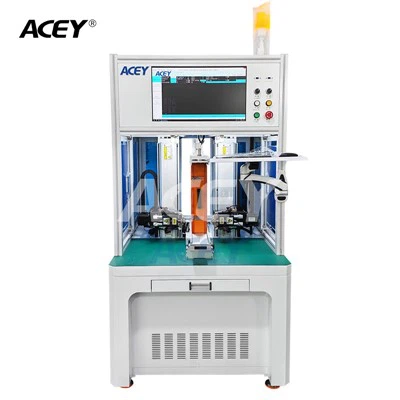
In the realm of battery management systems (BMS), the ability to connect Bms Testing Equipment to a computer is crucial for efficient data analysis, monitoring, and control. As a reputable Bms Testing Equipment supplier, I understand the significance of seamless integration between testing equipment and computers. In this blog post, I will delve into the software requirements necessary to establish this connection, providing you with valuable insights to enhance your testing processes.
Understanding the Basics of Bms Testing Equipment
Before we explore the software requirements, let's briefly understand the role of Bms Testing Equipment. BMS is a critical component in battery systems, responsible for monitoring and managing the performance, safety, and longevity of batteries. Bms Testing Equipment is designed to evaluate the functionality and performance of BMS under various conditions, ensuring its reliability and compliance with industry standards.
Our Bms Testing Machine and Optional 1-32Series 500A Charge 800A Discharge Battery Management System Test Equipment are among the advanced solutions we offer. These equipment are equipped with sophisticated sensors and measurement capabilities to accurately assess the performance of BMS. However, to fully utilize the data collected by these devices, it is essential to connect them to a computer for further analysis and visualization.


Software Requirements for Connecting Bms Testing Equipment to a Computer
Communication Protocol Software
The first step in connecting Bms Testing Equipment to a computer is to establish a communication protocol. Different Bms Testing Equipment may use various communication protocols, such as RS-232, USB, Ethernet, or CAN bus. Therefore, the software must support the specific communication protocol used by the testing equipment.
For example, if the Bms Testing Equipment uses an RS-232 interface, the software should have the necessary drivers and communication libraries to establish a serial connection with the device. Similarly, for Ethernet-based communication, the software should support TCP/IP protocols to enable data transfer over the network.
Data Acquisition and Analysis Software
Once the communication is established, the next requirement is software for data acquisition and analysis. This software is responsible for collecting data from the Bms Testing Equipment, storing it in a database, and performing various analysis tasks.
The data acquisition software should be able to handle real-time data streams from the testing equipment, ensuring that no data is lost during the transfer process. It should also provide features for data logging, such as timestamping and data compression, to optimize storage space.
In terms of data analysis, the software should offer a range of tools and algorithms to process the collected data. This may include statistical analysis, curve fitting, and graphical visualization. For instance, the software can generate graphs and charts to display the battery voltage, current, temperature, and other parameters over time, allowing users to easily identify trends and anomalies.
Device Configuration and Control Software
In addition to data acquisition and analysis, the software should also provide functionality for device configuration and control. This allows users to set up the Bms Testing Equipment according to their specific testing requirements, such as setting the test parameters, selecting the measurement channels, and controlling the test sequence.
The device configuration software should have an intuitive user interface that enables users to easily navigate through the different settings and options. It should also provide feedback and error messages to ensure that the configuration is correct and the testing equipment is operating properly.
Moreover, the software should support remote control capabilities, allowing users to control the Bms Testing Equipment from a computer located at a different location. This is particularly useful for large-scale testing facilities or when the testing equipment is installed in a hazardous environment.
Compatibility and Integration
When selecting software for connecting Bms Testing Equipment to a computer, it is important to ensure compatibility and integration with the existing hardware and software systems. The software should be able to work seamlessly with the operating system of the computer, as well as other software applications that may be used for data management and analysis.
Furthermore, the software should support integration with other testing equipment and systems, such as battery cyclers and environmental chambers. This enables users to perform comprehensive testing and analysis by combining data from multiple sources.
Our Recommended Software Solutions
As a Bms Testing Equipment supplier, we have extensive experience in working with different software solutions. Based on our expertise, we recommend the following software for connecting our Bms Testing Equipment to a computer:
[Software Name 1]
This software is a comprehensive solution for data acquisition, analysis, and device control. It supports a wide range of communication protocols, including RS-232, USB, and Ethernet, making it compatible with most Bms Testing Equipment.
The software offers advanced data analysis tools, such as statistical analysis and graphical visualization, to help users gain valuable insights from the collected data. It also provides a user-friendly interface for device configuration and control, allowing users to easily set up and manage the testing process.
[Software Name 2]
Another recommended software is [Software Name 2], which is specifically designed for battery testing applications. It provides features for real-time data monitoring, data logging, and analysis, as well as device configuration and control.
The software supports integration with other testing equipment and systems, enabling users to perform comprehensive battery testing. It also offers a customizable reporting feature, allowing users to generate detailed reports based on their specific requirements.
Conclusion
Connecting Bms Testing Equipment to a computer is essential for efficient battery testing and analysis. By selecting the right software, users can fully utilize the capabilities of the testing equipment, gain valuable insights from the collected data, and optimize the performance of their battery management systems.
As a Bms Testing Equipment supplier, we are committed to providing our customers with high-quality testing equipment and reliable software solutions. If you are interested in learning more about our Bms Testing Equipment or the software requirements for connecting them to a computer, please feel free to contact us for further discussion and procurement negotiation. We look forward to working with you to meet your testing needs.
References
- [List of relevant industry standards and technical documents related to BMS testing and software requirements]
- [Any other references used in the preparation of this blog post]